Construction Team v1.18 - Tasks, Leave, Passwordless Sign-In and Quantities from the IFC Model
Construction Team v1.18 brings the company's tasks into one menu, keeps track of leave and lets employees sign in without a password. On top of that, the bill of quantities now comes straight from the IFC model, and the contract, the act and the invoice are reconciled on one screen. AI assistants connected through MCP can now do almost everything a person does in the system.
Tasks have their own menu
Until now a task lived in the site schedule. But the office also has work that isn't tied to a site: ordering supplies, renewing an insurance policy, preparing tender documents. So tasks now have their own menu, and the site is optional.
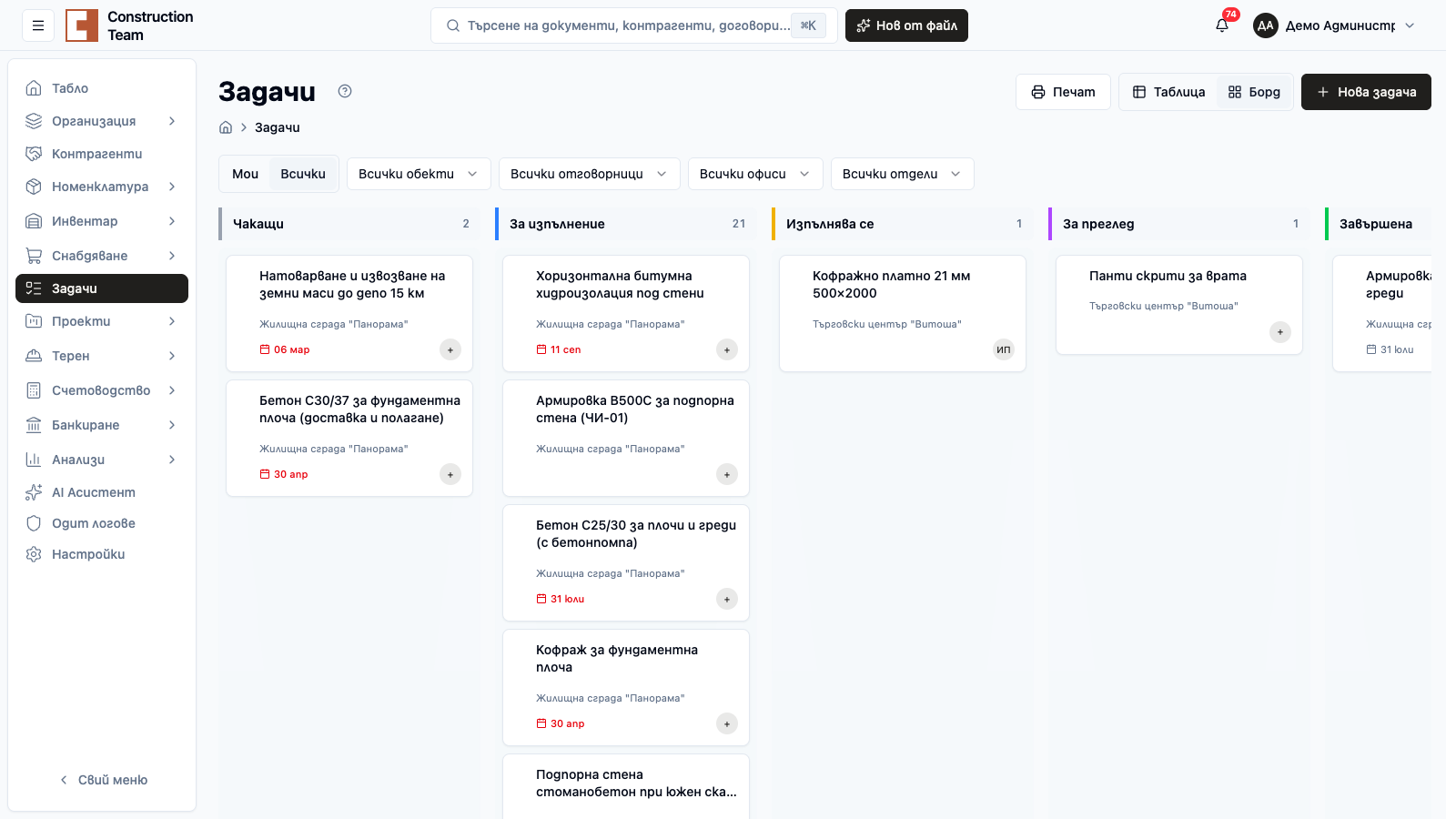
You can see tasks as a table with filters, as a board by status or as a short list on your phone. The filters go into the page address, so you can send a colleague a link to exactly your view. A task has a checklist, an office, a department and a crew. A recurring task (for example, a weekly scaffolding check) is set up with a rule in the form and creates itself.
A list of tasks from Excel is imported with a preview before saving. Each assignee gets one notification for all their new tasks instead of one per task. Access is "all" or "own", so a worker sees only what is meant for them.
Leave is managed in the system
An employee opens "My leave", sees their balance and submits a request. The manager approves it from the "Pending Approvals" screen, and the approved leave shows up in the absence calendar and on the timesheets. The leave request comes out as a PDF, ready to sign.
Annual leave accrues automatically every night. Public holidays come from the company calendar and don't count as leave days.
Sign in without a password
Next to the password and two-factor sign-in we added passkeys. You add one from your personal "Security" screen and then sign in with your fingerprint, face or the PIN of your phone or laptop. A passkey can't be stolen through a fake sign-in page, because it is bound to our address.
Each user can now turn on two-factor sign-in on their own. The company administrator can turn it off for an employee who has changed their phone. After 3 failed attempts the sign-in asks you to prove you're not a robot, and the session expires 12 hours after sign-in. Changing your password also revokes the API keys and the connected AI assistants.
The bill of quantities comes from the IFC model
A bill of quantities is usually done by hand. Someone opens the drawings, measures, types it into Excel and then checks they haven't missed a floor. On a large building that is days of work, and every new revision of the design starts it all over again. Version 1.18 calculates the quantities straight from the IFC model the designer has already made.
The wizard has four steps. You pick the site and the IFC file, tick the elements that go into the takeoff and, if you like, link the floors to sub-objects. Then the system composes the takeoff on its own: concrete, formwork, reinforcement, masonry, building services. Structures are recognised by templates, and pipes come out in metres straight from the geometry, with no AI. Artificial intelligence is optional and helps where an element in the model is described unclearly.
The 3D view sits next to the table: click a row and you see which elements were counted in it. That way you quickly check whether the slab on the third floor is included and whether a wall has been counted twice. The view can be by element or by work method, the way a site manager thinks about it.
One element can go to several items. A wall, for example, is masonry, plaster and paint, each with its own quantity. For every process the system also adds labour: the quantity times the norm gives the man-hours. The norms are yours. You change them in "Settings → Labor norms" for the whole company, or on a single row in a particular takeoff.
The design changes, and your manual work stays. With a new version of the model you press "Recompose" and the system calculates the quantities again, while the rows you corrected or added by hand are kept. The finished takeoff is exported to Excel, or with one button it becomes a BoQ with lines linked to the items in the nomenclature. From there the usual path continues to the offer, the contract and the acts.
Why it helps: you don't measure drawings by hand, every number is backed by elements in the model, and a new design revision doesn't send you back to the start. More on the approach in the article on quantity surveying.
The contract, the act and the invoice on one screen
The document screen now shows the contract, the act (form 19) and the invoice side by side, with quantities and amounts line by line. The BoQ line, the contract line, the act line and the invoice line remember where they came from. So exceeding a contracted quantity, or an invoice without an act, is visible at once. We described how this chain works in detail in the article from the BoQ to the act and the invoice.
A supplier's invoice matches its lines to the lines of the act, and the site diary suggests a contract line when you record a subcontractor or a material.
The AI assistant does the work in the system for you
Since last month Claude and ChatGPT can connect to your company's data. Back then the assistant mostly read and answered. In version 1.18 it does the work: it creates and edits contracts, acts, offers, BoQs, price lists, payment certificates, accounting documents and payments. The site modules (diary, punch items, RFIs, submittals, inspections, meetings, equipment) and schedules work the same way.
What does that look like on a working day? You write to Claude "make an act under the Panorama residential building contract for the work done in October", and it puts together the act with the lines from the contract. You have a supplier invoice: the assistant gives you an upload link, you drop the file there, and it creates the expense and attaches the invoice to it. You say "generate a schedule for the site", and the schedule appears with its phases and dependencies. The documents the assistant creates are drafts by default. You review and issue them, or tell it to issue them.
The assistant now also knows what is inside the files themselves. It searches contracts, minutes and specifications by meaning, not just by exact word, and it reads Word and Excel. Ask "which contract has a penalty above 0.5% per day" and it answers from the text of the documents.
For the most common questions there are ready-made scenarios:
- contract reconciliation with the acts and invoices, with an explanation of every mismatch;
- weekly site overview: alerts, open RFIs and punch items, unpaid invoices and payments;
- price history of an item, purchase versus sale.
The assistant also compares the takeoff from the IFC model with the BoQ and with what has been billed in acts so far. You see where the contracted or billed quantities differ from the model before the difference reaches an invoice.
You stay in control. The assistant works with the permissions of the person who connected it, and the key's permissions are set as a module × action table: for example, it can read accounting but not write to it. Every change stays in the audit log, marked as coming through MCP or the API, and changing your password disconnects all connected assistants.
Why it helps: routine work (an act from a contract, an expense from a supplier invoice, the month-end reconciliation) takes one sentence, and you check the result instead of typing it in.
Access per account
Bank and cash accounts now have their own access. The account detail shows who can see it and who can write to it. A hidden account doesn't show up anywhere: not in the balance or the movements, not in search, the trash or the AI assistant.
Connection with Nula
Companies that use Nula connect it from "Settings → Integrations". An issued sales invoice goes to Nula on its own, and its detail shows the number and status there.
Import updates, not just adds
Items, groups, units of measure, partners, sites, departments, offices, positions and accounts can now be imported in "New + update existing" mode. With "Download with current data" you get the file, change prices or units in Excel and upload it back. Before "Replace" the system shows what will change and waits for confirmation.
Other improvements and fixes
- Lines in the offer, the tender, the act, the contract and the change order have groups and subgroups, with filters by group and sub-object
- The material list (including from LayPLAN) can be imported while the BoQ is being created
- The budget has a single health score based on CPI and delay, and hours carry a rate for the cost of labour
- Separate approval permissions for acts, change orders, budgets, tenders, stock movements and orders
- The trash has a filter by type and a search by who deleted the record, and tasks, sub-objects, drawings and tenders can now be restored from it
- Word and Excel files are included in search
- Amounts in lists, details and PDFs are in the document's currency
- The schedule orders floors by sub-object and has a chart with phases and the critical path
- A due date of today no longer shows as overdue
- Ctrl+S and Ctrl+K also work with a Cyrillic keyboard layout
Start a free trial and see the new features in action.
Related articles
Frequently asked questions
Does a task have to belong to a site?
No. Since version 1.18 tasks have their own menu, and a task can have no site at all, for example ordering office equipment or renewing an insurance policy. The site, office and department are optional.
How do I sign in with a passkey?
Add the passkey from your personal "Security" screen. Then, on the sign-in screen, choose to sign in with a passkey and confirm with your fingerprint, face or the device PIN, without typing a password.
Can the Excel import update existing items?
Yes. The "New + update existing" mode adds the new rows and changes the data of the ones already entered. Download the file with the current data, correct it and upload it back.
Want to see the system with your own numbers?
Construction Team keeps the bill of quantities, the offer, the progress certificate and the invoice in one system, with no retyping. Answer six short questions and we will show you how.
Request a demo