From the bill of quantities to the act and the invoice, without retyping the items
One item from the bill of quantities, say the concrete for the slab, passes through five documents before the client pays for it. If those documents live in Excel and Word, the item is copied four times, and every copy is a chance to lose a line or keep an old price.
When the documents are linked in one quantity surveying software for construction, the item is entered once and travels from the BOQ to the invoice without retyping. In Construction Team everyone enters only what they are responsible for: the estimator sets the price, the site manager enters the completed quantity, the supervisor approves the act, and the accountant issues the invoice. If you are about to prepare your first BOQ, there is a separate article on what a BOQ is and how to make one.
The estimator, the site manager and the accountant all type the same thing
When the BOQ is in Excel and the contract and acts are in Word, the estimator copies the description, the unit and the quantity from the BOQ into the offer and adds a price. Once the client accepts, the same lines go into the contract annex. Every month the site manager prepares an act and again carries over the description, the unit and the unit price, this time from the contract. Finally the accountant transfers the amounts from the act into the invoice.
The errors come from the copying itself. The price was changed in the offer but the contract still has the old one. An item added later is missing from the act. The invoice carries last month's amount. The same number sits in four places, and every change has to reach all of them.
The estimator builds the offer from the finished BOQ
The estimator creates an offer from the finished BOQ without copying lines. The descriptions, units and quantities come with the items, and the unit price of each one comes from the company's nomenclature. In the offer the estimator can change the price of a single item or the margin without touching the nomenclature.
With the nomenclature, the software does the job of construction pricing software: the company keeps its prices there and every new offer starts from them.
Once the client accepts the offer, a contract is created from it
The client receives a link by email, opens the offer in the browser and accepts it. The contract is created from the accepted offer, and its items move into it with their quantities, prices and sub-objects. The offer's terms come along too: the payment deadline and the warranty.
The retention percentage is also set in the contract. That percentage then applies to every act and every invoice under the contract, without anyone typing it again.
The site manager enters only the completed work
The site manager creates an act from the contract items. The descriptions, unit prices and amounts are already there, and the manager enters the quantity completed during the period. The software knows how much was contracted and how much has been certified so far, but how much concrete was poured this month is something the person on site tells it. Under a contract with a client the act is a revenue act, under a contract with a subcontractor it is an expense act. We have also described what a Form 19 act contains.
For every contract item the remaining quantity is kept, that is, how much can still be certified. If the manager enters more than that, the software refuses the quantity and shows how much remains. From act to act, the progress on the item accumulates, and how cumulative progress is calculated is explained in the article on acts.
Before it is signed, the supervisor approves the act
The act has two more steps: approval and signature. The supervisor, usually the technical manager, reviews and approves it. It can be signed only after the approval. Every step is recorded with the date, time and user. If the supervisor finds a mistake, they reject it with a comment and the act goes back to draft for correction.
The accountant creates the invoice from the signed act
Once a revenue act is signed, the accountant can issue an invoice from the signed act. The items, amounts and VAT come from the act, the due date fills itself in, and only the date and the payment method are left to enter by hand. The two documents stay linked and you can go from one to the other.
In the invoice for the work, the advance is deducted and the retention under the contract is withheld separately. The advance can be deducted right after the advance invoice is issued, without waiting for it to be paid. For every invoice under a contract with an advance, the software suggests an amount, and if the accountant leaves the advance untouched, they write down the reason. The details are in a separate article on how the advance is deducted and in our guide to retentions.
When the client pays, the invoice changes its status from "unpaid" through "partially paid" to "paid". Invoices past their due date are flagged as overdue.
Has last month's act been invoiced?
The answer is in the act itself. It shows a diagram of the document chain: the contract, the previous acts under it and the invoices. If a link is missing, it is marked, and you can see where the process stopped without searching through folders.
In the example, the slab concrete is certified in two acts
The example is made up and its numbers do not come from a real site. Say the BOQ has an item "Concrete C25/30 for slab" with 120 m³. The offer has been accepted, the contract has an advance of €1,800 and a retention of 5%, and each act deducts 10% of its value until the advance is used up. VAT is left aside so the item is easy to follow.
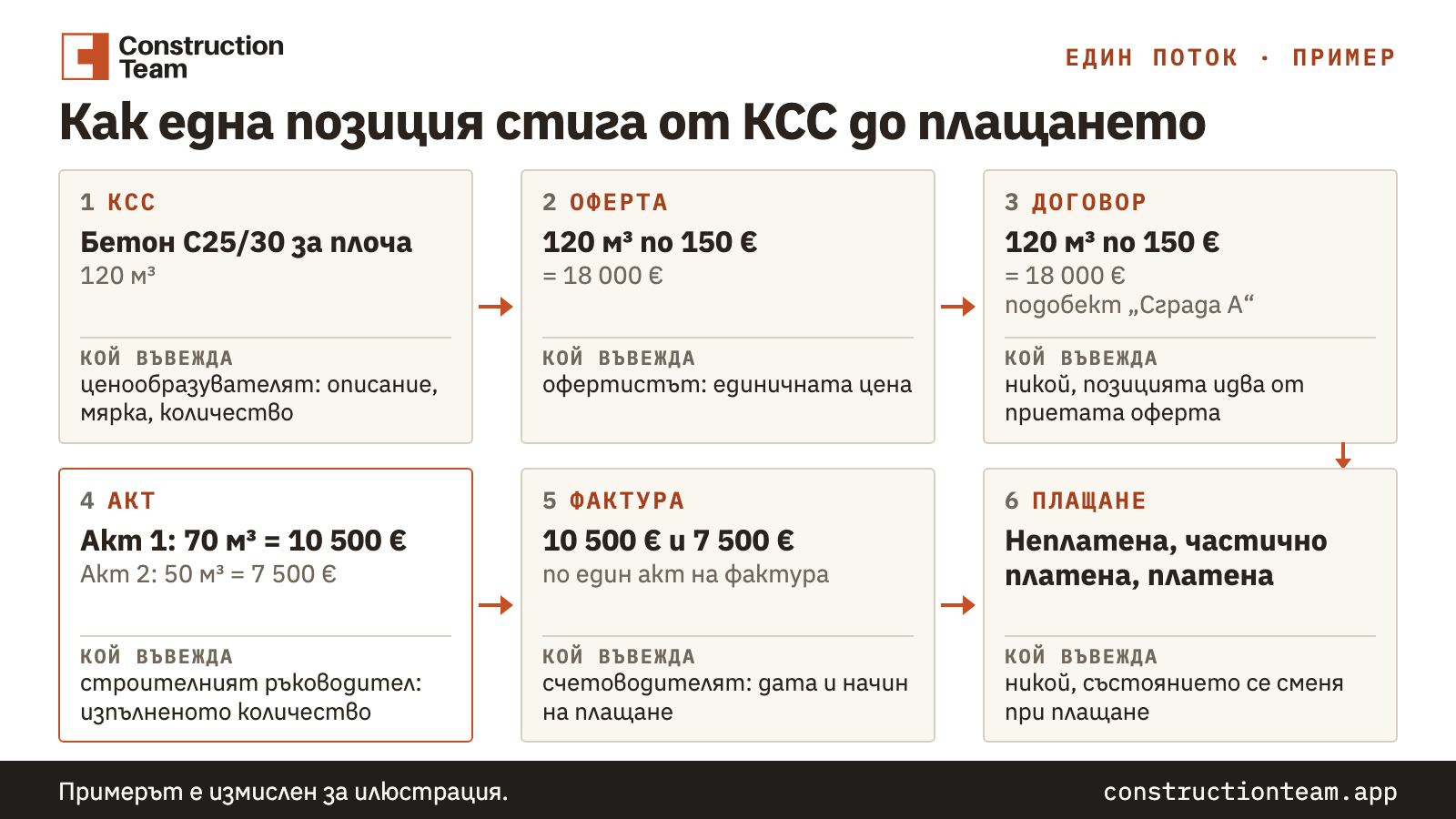
| Document | What the item shows (in the example) | Who enters what |
|---|---|---|
| BOQ | Concrete C25/30 for slab, 120 m³ | the quantity surveyor: the description, the unit and the quantity |
| Offer | 120 m³ at €150 = €18,000 | the estimator: the unit price, which comes from the nomenclature |
| Contract | 120 m³ at €150 = €18,000, sub-object "Building A" | nobody retypes it: the item is taken from the accepted offer |
| Act 1 | completed 70 m³ = €10,500, remaining 50 m³ | the site manager: 70 m³ |
| Invoice for act 1 | €10,500, advance deducted €1,050, retention €525 withheld separately | the accountant: date and payment method |
| Act 2 | completed 50 m³ = €7,500, remaining 0 | the site manager: 50 m³ |
| Invoice for act 2 | €7,500, advance deducted €750, retention €375 withheld separately | the accountant: date and payment method |
In the second act the site manager types 55 m³ by mistake. The software refuses the quantity and says the remaining amount is 50 m³. The manager corrects the number, the supervisor approves the act, the signature follows and the accountant creates the second invoice. After it, the whole €1,800 advance has been deducted.
The description and the unit of the item were entered once, in the BOQ, and the price once, in the offer. After that people add only quantities, approvals and dates.
What happens to the items after the BOQ?
Software for preparing a BOQ saves the estimator from copying into the offer. If the items do not continue into the contract, the act and the invoice, the site manager and the accountant still type them by hand every month, and the copying errors stay with them.
You can see what the BOQ itself looks like and how an offer is made from it on the page of our quantity surveying software for construction. You can sign up from the button there.
Frequently asked questions
How do I create an invoice from an act?
Once a revenue act is signed, you create the invoice from it. The items, amounts and VAT come from the act, the due date fills itself in, and the accountant adds the date and the payment method. The act and the invoice stay linked in the document chain.
Can an act record a quantity above the contracted one?
No. The software keeps the remaining quantity for every contract item. If an act records more than what is left, it refuses the quantity and shows how much remains.
What is entered by hand when the BOQ, the offer, the contract, the act and the invoice are linked?
The description, the unit and the quantity are written once, in the BOQ. In the offer you change the price and the margin, in the act you enter the quantities completed during the period, and in the invoice the date and the payment method. The supervisor, usually the technical manager, approves the act, and it can be signed only after that approval.
How are the advance and the retention reflected in the invoice?
In the invoice for the work, the advance is deducted and the retention under the contract is withheld separately. The retention percentage is set in the contract. The advance can be deducted once the advance invoice is issued, without waiting for it to be paid.